ShopDreamUp AI ArtDreamUp
Deviation Actions





Description
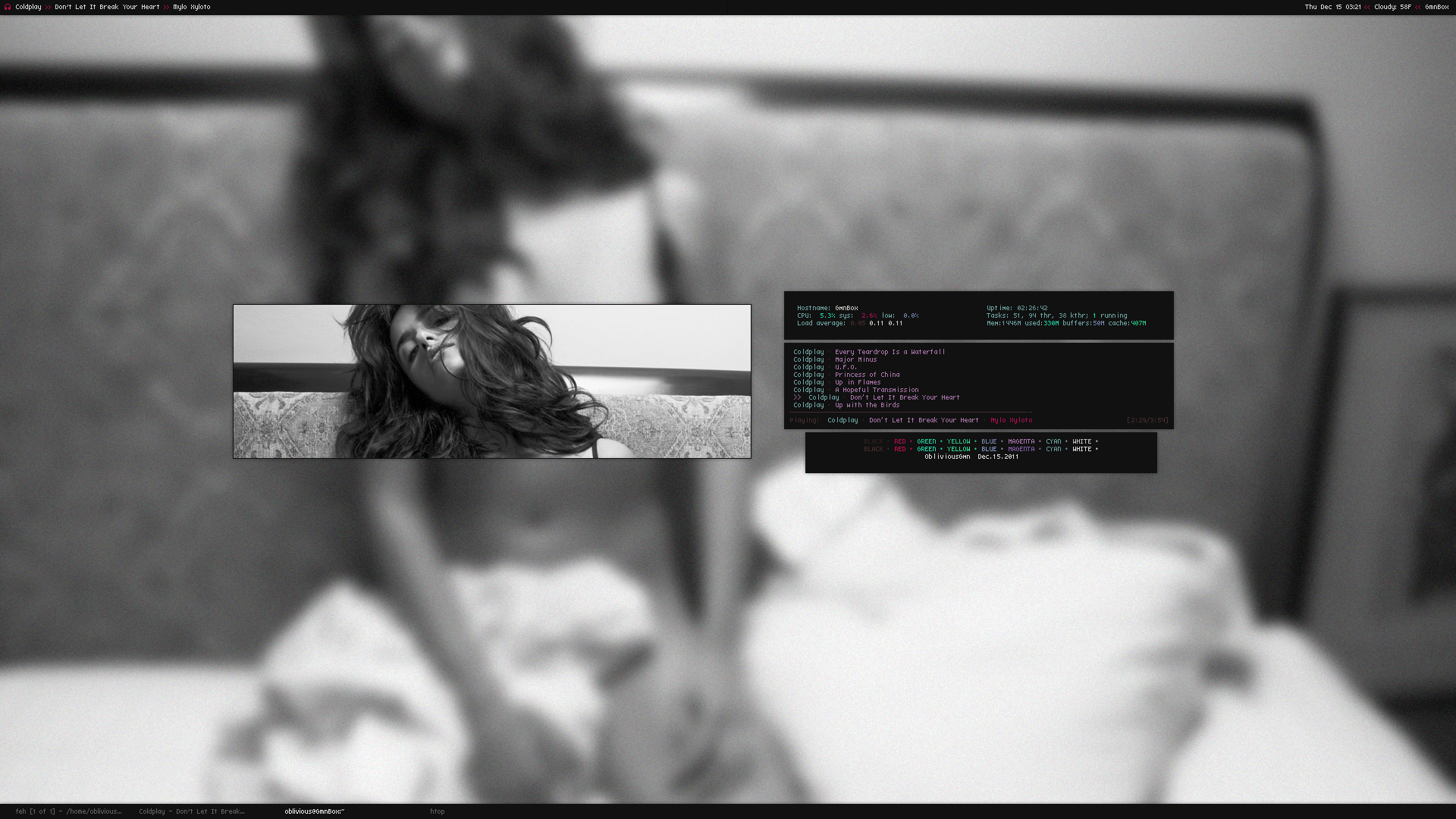
Nothing much has changed, I've been rarely tweaking stuff around. Just a sign of Comfort for now.
Before anything, Check out Dotshare.it [link]
You'll find my goodies, and other great configs.
- Feh
- Ncmpcpp [link]
- Dzen W/ Conky
- Screenshot script w/ colors
- Htop
- Term Colors [link]
If anyone is still intrested on the Dzen Conky file is avaliable for grabs. with a few tips.
I tried to clean it up a bit for you guys, So you can edit your desired directory and all. Everything is noted so it should be fine and easy to use. But if anything Let me know.
INFO MPD & StartupDzen files must be adjusted to your settings
- If you're using Openbox, Is best to put the startup on your .Xinitrc
- Also add this to your Application section on your rc.xml
It allows the dzen to dock and changes it to a bottom layer.
(Dzen2 likes to stay on top by default)
<application class="dzen" name="dzen2">
<layer>below</layer>
</application>
That should be all. Enjoy it.
[link]
If you like to reach me, You can find me in the Rizon IRC server. #ObliviousGmn
Before anything, Check out Dotshare.it [link]
You'll find my goodies, and other great configs.
- Feh
- Ncmpcpp [link]
- Dzen W/ Conky
- Screenshot script w/ colors
- Htop
- Term Colors [link]
If anyone is still intrested on the Dzen Conky file is avaliable for grabs. with a few tips.
I tried to clean it up a bit for you guys, So you can edit your desired directory and all. Everything is noted so it should be fine and easy to use. But if anything Let me know.
INFO MPD & StartupDzen files must be adjusted to your settings
- If you're using Openbox, Is best to put the startup on your .Xinitrc
- Also add this to your Application section on your rc.xml
It allows the dzen to dock and changes it to a bottom layer.
(Dzen2 likes to stay on top by default)
<application class="dzen" name="dzen2">
<layer>below</layer>
</application>
That should be all. Enjoy it.
[link]
If you like to reach me, You can find me in the Rizon IRC server. #ObliviousGmn
Image size
1920x1080px 3.63 MB
© 2011 - 2024 ObliviousGmn
Comments40
Join the community to add your comment. Already a deviant? Log In
Nice!